
На клиенте не применяются CSS стили, в то время, как они загружены с сервера?
phpМyАdmin, nginx. Php версии 8.3.x
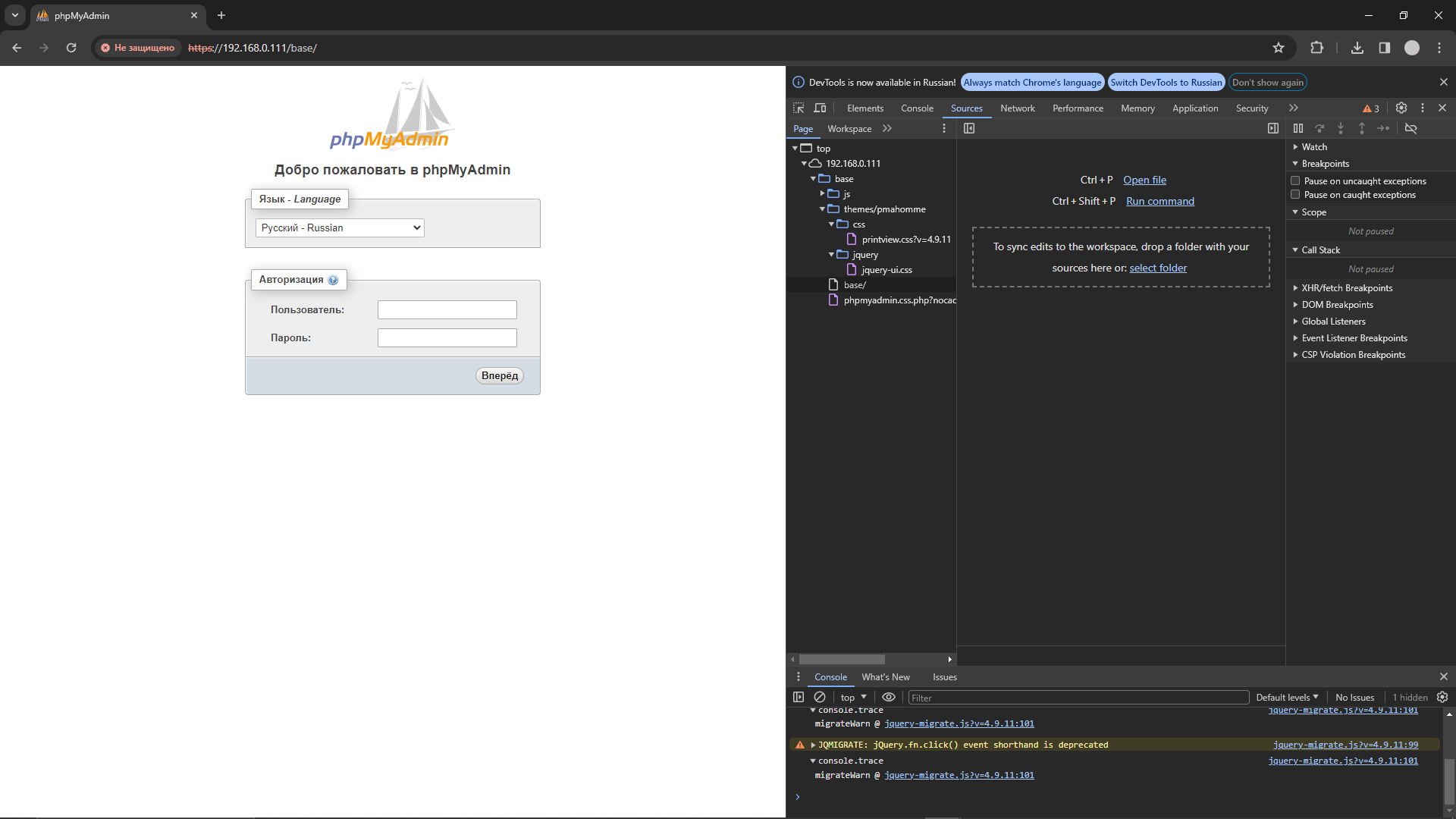
Проблема: На клиенте не применяются CSS стили, в то время, как они загружены с сервера (ответ 200). В версии phpMyAdmin 5.2.1 Это выглядит так:

Картинки подгружаются, стили тоже. Но стили не работают.
Curl -vvv по ссылке на *.CSS выдаёт:
< content-type: text/html; charset=UTF-8 < vary: Accept-Encoding < x-powered-by: PHP/8.3.2 |
< content-type: text/html; charset=UTF-8 < vary: Accept-Encoding < x-powered-by: PHP/8.3.2
В это же время phpMyAdmin версии 4.9.11 работает правильно:
Curl -vvv по ссылке на *.CSS выдаёт:
< content-type: text/css; charset=UTF-8 < vary: Accept-Encoding < x-powered-by: PHP/8.3.2 |
< content-type: text/css; charset=UTF-8 < vary: Accept-Encoding < x-powered-by: PHP/8.3.2
Кажется, такое-же поведение, как у phpMyAdmin 5.2.1 с не отображением стилей - у почтового клиента RoundCube через nginx.
Похоже на странности в отработке mime.types на nginx. И не хаотично, а именно на примере phpMyAdmin 5.2.1
UPD: Решено. Обе версии phpMyAdmin работают как нужно. Проблема была в конфиге nginx
Дополнительно:
Если стили не применяются, значит они не загружены. Либо загружены с неправильным content-type (отличным от text/css). Других вариантов нет.

Другой вариант это использовать рабочий phpMyAdmin 4.9.11, а вопрос по теме всё-таки остаётся актуальным
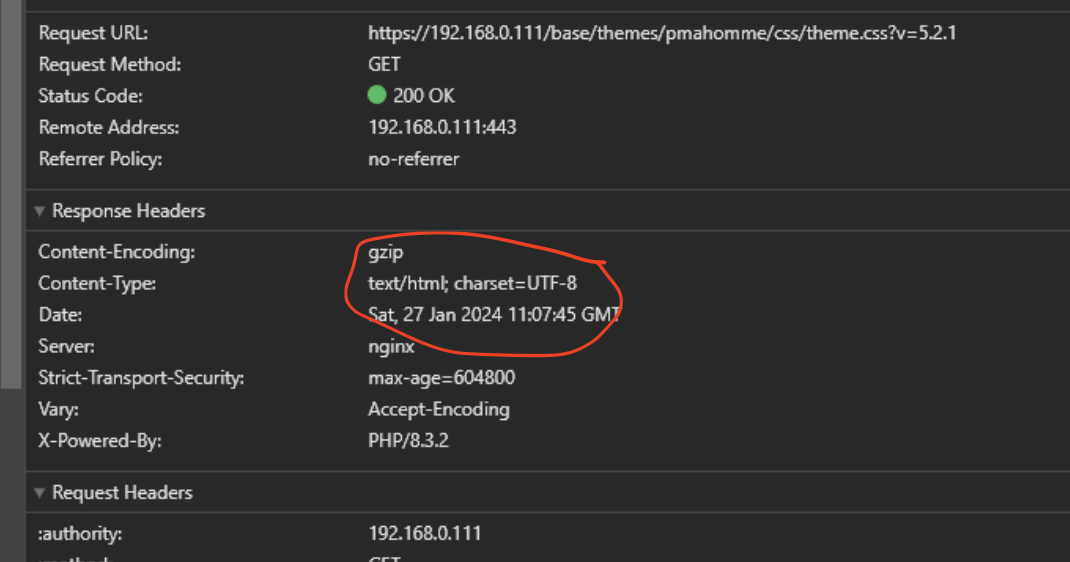
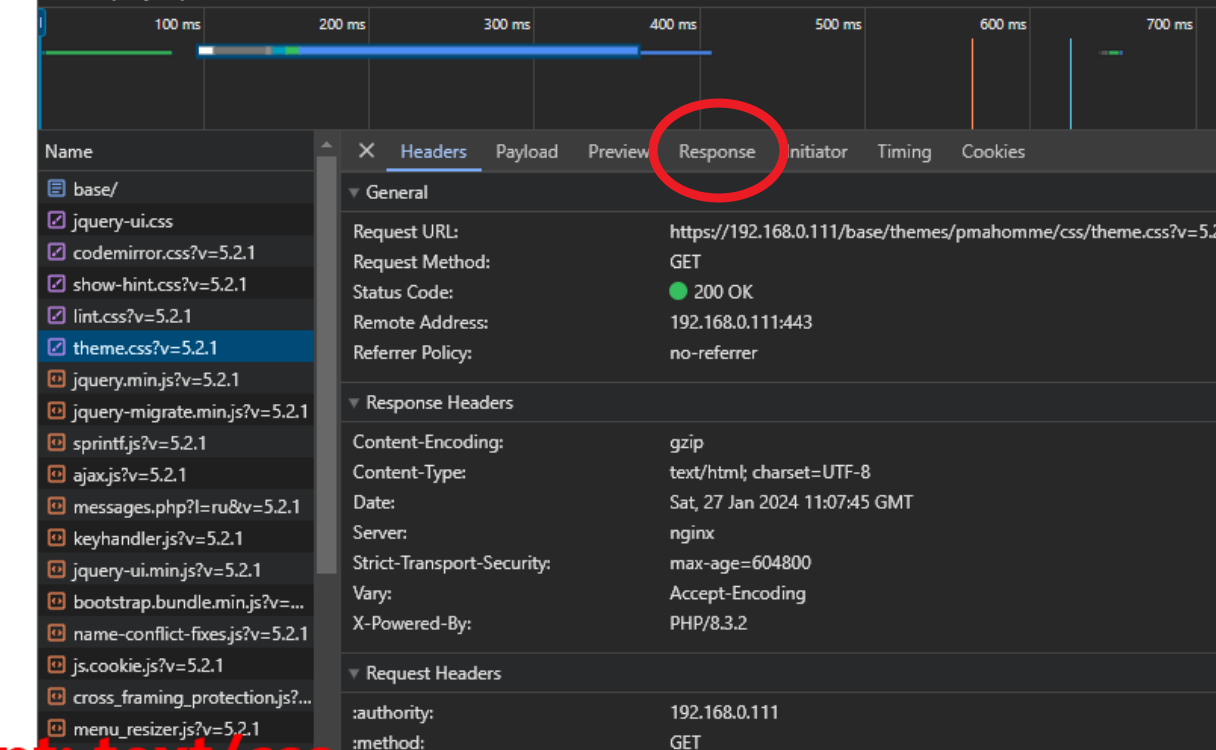
А выше – заголовок ответа - text/html
Посмотрите там реальный ответ (Preview или Response вкладки). Возможно, там 404 страница.
http { include mime.types; default_type: application/octet-stream } |
http { include mime.types; default_type: application/octet-stream }
Конфиг одинаковый. В логах ошибок нет, придраться не к чему. И для четвёртой версии это работает, а для пятой нет, и это нормально?
nginx -T посмотрите что он там делает.
root@localhost:/ # nginx -T nginx: the configuration file /usr/local/etc/nginx/nginx.conf syntax is ok nginx: configuration file /usr/local/etc/nginx/nginx.conf test is successful |
root@localhost:/ # nginx -T nginx: the configuration file /usr/local/etc/nginx/nginx.conf syntax is ok nginx: configuration file /usr/local/etc/nginx/nginx.conf test is successful
root@localhost:/ # nginx -t nginx: the configuration file /usr/local/etc/nginx/nginx.conf syntax is ok nginx: configuration file /usr/local/etc/nginx/nginx.conf test is successful |
root@localhost:/ # nginx -t nginx: the configuration file /usr/local/etc/nginx/nginx.conf syntax is ok nginx: configuration file /usr/local/etc/nginx/nginx.conf test is successful
nginx -t проводит проверку конфигурации
nginx -T проверяет и выводит всю конфигурацию
естественно я и хочу увидеть всю конфигурацию
user www; worker_processes 4; timer_resolution 100ms; worker_rlimit_nofile 8192; worker_priority -5; error_log /var/log/www/nginx-error.log; error_log /var/log/www/nginx-error-notice.log notice; error_log /var/log/www/nginx-error-info.log info; pid /var/run/nginx.pid; events { worker_connections 2048; use kqueue; } http { include mime.types; default_type application/octet-stream; log_format main '$remote_addr - $remote_user [$time_local] ' '"$request" $status $bytes_sent ' '"$http_referer" "$http_user_agent" ' '"$gzip_ratio"'; access_log /var/log/www/nginx-access.log main; sendfile on; client_max_body_size 128M; keepalive_timeout 165; tcp_nopush on; tcp_nodelay on; server_tokens off; add_header X-Frame-Options "SAMEORIGIN" always; add_header X-XSS-Protection "1; mode=block" always; add_header X-Content-Type-Options "nosniff" always; add_header Referrer-Policy "no-referrer-when-downgrade" always; add_header Content-Security-Policy "default-src * data: 'unsafe-eval' 'unsafe-inline'" always; proxy_redirect off; proxy_pass_header Set-Cookie; proxy_set_header Host $http_host; proxy_set_header X-Forwarded-Host $http_host; proxy_set_header X-Real-IP $remote_addr; proxy_set_header X-Forwarded-For $proxy_add_x_forwarded_for; proxy_connect_timeout 90; proxy_send_timeout 90; proxy_read_timeout 90; proxy_buffer_size 16k; proxy_buffers 32 16k; proxy_busy_buffers_size 64k; proxy_temp_file_write_size 64k; server_names_hash_max_size 256; server_names_hash_bucket_size 128; ssl_session_cache shared:SSL:10m; ssl_session_timeout 5m; ssl_prefer_server_ciphers on; client_body_buffer_size 128k; client_header_buffer_size 64k; gzip on; gzip_disable "msie6"; gzip_vary on; gzip_proxied any; gzip_comp_level 9; gzip_min_length 1100; gzip_buffers 64 8k; gzip_http_version 1.1; gzip_types text/plain text/css text/xml application/json application/javascript application/xml+rss application/atom+xml image/svg+xml; gzip_disable "MSIE [1-6].(?!.*SV1)"; include /usr/local/etc/nginx/conf/*.conf; } |
user www; worker_processes 4; timer_resolution 100ms; worker_rlimit_nofile 8192; worker_priority -5; error_log /var/log/www/nginx-error.log; error_log /var/log/www/nginx-error-notice.log notice; error_log /var/log/www/nginx-error-info.log info; pid /var/run/nginx.pid; events { worker_connections 2048; use kqueue; } http { include mime.types; default_type application/octet-stream; log_format main '$remote_addr - $remote_user [$time_local] ' '"$request" $status $bytes_sent ' '"$http_referer" "$http_user_agent" ' '"$gzip_ratio"'; access_log /var/log/www/nginx-access.log main; sendfile on; client_max_body_size 128M; keepalive_timeout 165; tcp_nopush on; tcp_nodelay on; server_tokens off; add_header X-Frame-Options "SAMEORIGIN" always; add_header X-XSS-Protection "1; mode=block" always; add_header X-Content-Type-Options "nosniff" always; add_header Referrer-Policy "no-referrer-when-downgrade" always; add_header Content-Security-Policy "default-src * data: 'unsafe-eval' 'unsafe-inline'" always; proxy_redirect off; proxy_pass_header Set-Cookie; proxy_set_header Host $http_host; proxy_set_header X-Forwarded-Host $http_host; proxy_set_header X-Real-IP $remote_addr; proxy_set_header X-Forwarded-For $proxy_add_x_forwarded_for; proxy_connect_timeout 90; proxy_send_timeout 90; proxy_read_timeout 90; proxy_buffer_size 16k; proxy_buffers 32 16k; proxy_busy_buffers_size 64k; proxy_temp_file_write_size 64k; server_names_hash_max_size 256; server_names_hash_bucket_size 128; ssl_session_cache shared:SSL:10m; ssl_session_timeout 5m; ssl_prefer_server_ciphers on; client_body_buffer_size 128k; client_header_buffer_size 64k; gzip on; gzip_disable "msie6"; gzip_vary on; gzip_proxied any; gzip_comp_level 9; gzip_min_length 1100; gzip_buffers 64 8k; gzip_http_version 1.1; gzip_types text/plain text/css text/xml application/json application/javascript application/xml+rss application/atom+xml image/svg+xml; gzip_disable "MSIE [1-6].(?!.*SV1)"; include /usr/local/etc/nginx/conf/*.conf; }
192.160.0.111.conf
server { listen 80 default_server; server_name 192.168.0.111 www.192.168.0.111; access_log /var/log/www/192.168.0.111-access-nginx.log; error_log /var/log/www/192.168.0.111-error-nginx.log; root /web/sites; client_max_body_size 2048m; rewrite ^ https://192.168.0.111$request_uri? permanent; #301-redirect } server { include /usr/local/etc/nginx/mime.types; listen 443 ssl http2 default_server; listen [::]:443 ssl http2 default_server; ssl_certificate /usr/local/etc/nginx/ssl/_server_/server.crt; ssl_certificate_key /usr/local/etc/nginx/ssl/_server_/server.key; ssl_protocols TLSv1 TLSv1.1 TLSv1.2; ssl_ciphers "HIGH:!RC4:!aNULL:!MD5:!kEDH"; add_header Strict-Transport-Security 'max-age=604800'; server_name 192.168.0.111 www.192.168.0.111; access_log /var/log/www/192.168.0.111-access-nginx.log; error_log /var/log/www/192.168.0.111-error-nginx.log; root /web/sites/; error_page 404 /404.html; location /404.html { break; } error_page 500 502 503 504 /50x.html; location = /50x.html { root /usr/local/www/nginx-dist; } location ~* { auth_basic "Admin"; auth_basic_user_file /web/sites/.htpasswd; fastcgi_pass unix:/tmp/php-fpm.sock; fastcgi_index index.php; fastcgi_param SCRIPT_FILENAME /web/sites$fastcgi_script_name; include fastcgi_params; } index index.php; location ~* .(jpg|jpeg|gif|png|css|zip|tgz|gz|rar|bz2|doc|xls|exe|pdf|ppt|tar|wav|bmp|rtf|swf|ico|flv|txt|xml|docx|xlsx)$ { access_log off; expires 30d; } location ~ ^/base/ { root /usr/local/www/phpMyAdmin/; index index.php index.html index.htm; } location /mail { # alias /usr/local/www/roundcube/; root /usr/local/www/roundcube/; index index.php index.html index.htm; } location ~ .php$ { fastcgi_param HTTPS on; # Для php-fpm try_files $uri $uri/ /index.php?$args; fastcgi_pass unix:/tmp/php-fpm.sock; fastcgi_index index.php; include fastcgi_params; fastcgi_param PATH_INFO $fastcgi_path_info; fastcgi_param DOCUMENT_ROOT $document_root; fastcgi_param SCRIPT_FILENAME $document_root$fastcgi_script_name; fastcgi_param PATH_TRANSLATED $document_root$fastcgi_script_name; fastcgi_param QUERY_STRING $query_string; fastcgi_param REQUEST_METHOD $request_method; fastcgi_param CONTENT_TYPE $content_type; fastcgi_param CONTENT_LENGTH $content_length; fastcgi_intercept_errors on; fastcgi_ignore_client_abort off; fastcgi_connect_timeout 60; fastcgi_send_timeout 180; fastcgi_read_timeout 180; fastcgi_buffer_size 128k; fastcgi_buffers 4 256k; fastcgi_busy_buffers_size 256k; fastcgi_temp_file_write_size 256k; } } |
server { listen 80 default_server; server_name 192.168.0.111 www.192.168.0.111; access_log /var/log/www/192.168.0.111-access-nginx.log; error_log /var/log/www/192.168.0.111-error-nginx.log; root /web/sites; client_max_body_size 2048m; rewrite ^ https://192.168.0.111$request_uri? permanent; #301-redirect } server { include /usr/local/etc/nginx/mime.types; listen 443 ssl http2 default_server; listen [::]:443 ssl http2 default_server; ssl_certificate /usr/local/etc/nginx/ssl/_server_/server.crt; ssl_certificate_key /usr/local/etc/nginx/ssl/_server_/server.key; ssl_protocols TLSv1 TLSv1.1 TLSv1.2; ssl_ciphers "HIGH:!RC4:!aNULL:!MD5:!kEDH"; add_header Strict-Transport-Security 'max-age=604800'; server_name 192.168.0.111 www.192.168.0.111; access_log /var/log/www/192.168.0.111-access-nginx.log; error_log /var/log/www/192.168.0.111-error-nginx.log; root /web/sites/; error_page 404 /404.html; location /404.html { break; } error_page 500 502 503 504 /50x.html; location = /50x.html { root /usr/local/www/nginx-dist; } location ~* { auth_basic "Admin"; auth_basic_user_file /web/sites/.htpasswd; fastcgi_pass unix:/tmp/php-fpm.sock; fastcgi_index index.php; fastcgi_param SCRIPT_FILENAME /web/sites$fastcgi_script_name; include fastcgi_params; } index index.php; location ~* .(jpg|jpeg|gif|png|css|zip|tgz|gz|rar|bz2|doc|xls|exe|pdf|ppt|tar|wav|bmp|rtf|swf|ico|flv|txt|xml|docx|xlsx)$ { access_log off; expires 30d; } location ~ ^/base/ { root /usr/local/www/phpMyAdmin/; index index.php index.html index.htm; } location /mail { # alias /usr/local/www/roundcube/; root /usr/local/www/roundcube/; index index.php index.html index.htm; } location ~ .php$ { fastcgi_param HTTPS on; # Для php-fpm try_files $uri $uri/ /index.php?$args; fastcgi_pass unix:/tmp/php-fpm.sock; fastcgi_index index.php; include fastcgi_params; fastcgi_param PATH_INFO $fastcgi_path_info; fastcgi_param DOCUMENT_ROOT $document_root; fastcgi_param SCRIPT_FILENAME $document_root$fastcgi_script_name; fastcgi_param PATH_TRANSLATED $document_root$fastcgi_script_name; fastcgi_param QUERY_STRING $query_string; fastcgi_param REQUEST_METHOD $request_method; fastcgi_param CONTENT_TYPE $content_type; fastcgi_param CONTENT_LENGTH $content_length; fastcgi_intercept_errors on; fastcgi_ignore_client_abort off; fastcgi_connect_timeout 60; fastcgi_send_timeout 180; fastcgi_read_timeout 180; fastcgi_buffer_size 128k; fastcgi_buffers 4 256k; fastcgi_busy_buffers_size 256k; fastcgi_temp_file_write_size 256k; } }

Ковыряйте дальше конфиги nginx, чтобы выяснить, почему сервер отдает файл с неверным заголовком.
Сергей delphinpro, что тут ясно, так это то, что также принимается и четвёртая версия phpMyAdmin, и браузер ничего не считает, стили отрабатываются как нужно. В том числе на других локальных сайтах. Я об этом уже третий раз пишу, и конфиг nginx выше уже предоставил, если считаете что в нём ошибка - пожалуйста, будьте добры, укажите в каком именно месте, ибо всё что нужно для работы web сервера - указано. Я пока что не вижу что там еще можно ковырять, поэтому и задал вопрос
root@localhost:~ # curl -k https://192.168.0.111/base/themes/pmahomme/css/theme.css :root{--bs-blue: #0d6efd;--bs-indigo: #6610f2;--bs-purple: #6f42c1;--bs-pink: #d63384;--bs-red: #dc3545;--bs-orange: #fd7e14;--bs-yellow: #ffc107;--bs-green: #198754;--bs-teal: #20c997;--bs-cyan: #0dcaf0;--bs-black: #000;--bs-white: #fff;--bs-gray: #6c757d;--bs-gray-dark: #343a40;--bs-gray-100: #f8f9fa;--bs-gray-200: #e9ecef;--bs-gray-300: #dee2e6;--bs-gray-400: #ced4da;--bs-gray-500: #adb5bd;--bs-gray-600: #6c757d;--bs-gray-700: #495057;--bs-gray-800: #343a40;--bs-gray-900: #212529;--bs-primary: #ddd;--bs-secondary: #ddd;--bs-success: #198754;--bs-info: #0dcaf0;--bs-warning: #ffc107;--bs-danger: #dc3545;--bs-light: #f8f9fa;--bs-dark: #212529;--bs-primary-rgb: 221, 221, 221;--bs-secondary-rgb: 221, 221, 221;--bs-success-rgb: 25, 135, 84;--bs-info-rgb: 13, 202, 240;--bs-warning-rgb: 255, 193, 7;--bs-danger-rgb: 220, 53, 69;--bs-light-rgb: 248, 249, 250;--bs-dark-rgb: 33, 37, 41;--bs-white-rgb: 255, 255, 255;--bs-black-rgb: 0, 0, 0;--bs-body-color-rgb: 68, 68, 68;--bs-body-bg-rgb: 255, 255, 255; |
root@localhost:~ # curl -k https://192.168.0.111/base/themes/pmahomme/css/theme.css :root{--bs-blue: #0d6efd;--bs-indigo: #6610f2;--bs-purple: #6f42c1;--bs-pink: #d63384;--bs-red: #dc3545;--bs-orange: #fd7e14;--bs-yellow: #ffc107;--bs-green: #198754;--bs-teal: #20c997;--bs-cyan: #0dcaf0;--bs-black: #000;--bs-white: #fff;--bs-gray: #6c757d;--bs-gray-dark: #343a40;--bs-gray-100: #f8f9fa;--bs-gray-200: #e9ecef;--bs-gray-300: #dee2e6;--bs-gray-400: #ced4da;--bs-gray-500: #adb5bd;--bs-gray-600: #6c757d;--bs-gray-700: #495057;--bs-gray-800: #343a40;--bs-gray-900: #212529;--bs-primary: #ddd;--bs-secondary: #ddd;--bs-success: #198754;--bs-info: #0dcaf0;--bs-warning: #ffc107;--bs-danger: #dc3545;--bs-light: #f8f9fa;--bs-dark: #212529;--bs-primary-rgb: 221, 221, 221;--bs-secondary-rgb: 221, 221, 221;--bs-success-rgb: 25, 135, 84;--bs-info-rgb: 13, 202, 240;--bs-warning-rgb: 255, 193, 7;--bs-danger-rgb: 220, 53, 69;--bs-light-rgb: 248, 249, 250;--bs-dark-rgb: 33, 37, 41;--bs-white-rgb: 255, 255, 255;--bs-black-rgb: 0, 0, 0;--bs-body-color-rgb: 68, 68, 68;--bs-body-bg-rgb: 255, 255, 255;
Правда по полной ссылке не тянет которая с аргументами после знака вопроса curl
root@localhost:~ # curl -k https://192.168.0.111/base/themes/pmahomme/css/theme.css?v=5.2.1 curl: No match. |
root@localhost:~ # curl -k https://192.168.0.111/base/themes/pmahomme/css/theme.css?v=5.2.1 curl: No match.
Так и должно быть?
/usr/local/www/phpMyAdmin
/usr/local/www/roundcube
А в директории /web/sites символические ссылки в виде директорий /base и /mail
curl -k "https://192.168.0.111/base/themes/pmahomme/css/theme.css?v=5.2.1" -vvv |
curl -k "https://192.168.0.111/base/themes/pmahomme/css/theme.css?v=5.2.1" -vvv
конфиг явно кривой, т.к. сейчас обработка всех запросов, даже статики, идёт через PHP
а вот как исправить зависит от того, что именно нужно получить
Дмитрий, прошу прощения за невнимательность, с -vvv гляну
Чтобы найти location, соответствующий запросу, вначале проверяются location’ы, заданные префиксными строками (префиксные location’ы). Среди них ищется location с совпадающим префиксом максимальной длины и запоминается. Затем проверяются регулярные выражения, в порядке их следования в конфигурационном файле. Проверка регулярных выражений прекращается после первого же совпадения, и используется соответствующая конфигурация. Если совпадение с регулярным выражением не найдено, то используется конфигурация запомненного ранее префиксного location’а.
moorzilla, теперь внимательно смотрим что в конфиге.
Вот тут location ~* { вместо шаблона пусто так что это совпадёт с любым адресом.
Этот location выше остальных и проверка регулярных выражений прекращается после первого же совпадения.
Все запросы отправляются в php-fpm.
location ~* { auth_basic "Admin"; auth_basic_user_file /web/sites/.htpasswd; fastcgi_pass unix:/tmp/php-fpm.sock; fastcgi_index index.php; fastcgi_param SCRIPT_FILENAME /web/sites$fastcgi_script_name; include fastcgi_params; } index index.php; location ~* .(jpg|jpeg|gif|png|css|zip|tgz|gz|rar|bz2|doc|xls|exe|pdf|ppt|tar|wav|bmp|rtf|swf|ico|flv|txt|xml|docx|xlsx)$ { access_log off; expires 30d; } location ~ ^/base/ { root /usr/local/www/phpMyAdmin/; index index.php index.html index.htm; } |
location ~* { auth_basic "Admin"; auth_basic_user_file /web/sites/.htpasswd; fastcgi_pass unix:/tmp/php-fpm.sock; fastcgi_index index.php; fastcgi_param SCRIPT_FILENAME /web/sites$fastcgi_script_name; include fastcgi_params; } index index.php; location ~* .(jpg|jpeg|gif|png|css|zip|tgz|gz|rar|bz2|doc|xls|exe|pdf|ppt|tar|wav|bmp|rtf|swf|ico|flv|txt|xml|docx|xlsx)$ { access_log off; expires 30d; } location ~ ^/base/ { root /usr/local/www/phpMyAdmin/; index index.php index.html index.htm; }
Попробуйте поменять этот фрагмент на такой:
index index.php; location ~* .(jpg|jpeg|gif|png|css|zip|tgz|gz|rar|bz2|doc|xls|exe|pdf|ppt|tar|wav|bmp|rtf|swf|ico|flv|txt|xml|docx|xlsx)$ { access_log off; expires 30d; } location ^~ /base/ { location ~ .php$ { fastcgi_pass unix:/tmp/php-fpm.sock; fastcgi_param SCRIPT_FILENAME $document_root$fastcgi_script_name; include fastcgi_params; } } |
index index.php; location ~* .(jpg|jpeg|gif|png|css|zip|tgz|gz|rar|bz2|doc|xls|exe|pdf|ppt|tar|wav|bmp|rtf|swf|ico|flv|txt|xml|docx|xlsx)$ { access_log off; expires 30d; } location ^~ /base/ { location ~ .php$ { fastcgi_pass unix:/tmp/php-fpm.sock; fastcgi_param SCRIPT_FILENAME $document_root$fastcgi_script_name; include fastcgi_params; } }
root@localhost:/home/user# curl -k "https://192.168.0.111/base/themes/pmahomme/css/theme.css?v=5.2.1" -vvv --user "xxx:xxx" * Trying 192.168.0.111:443... * Connected to 192.168.0.111 (192.168.0.111) port 443 * ALPN: curl offers h2,http/1.1 * TLSv1.3 (OUT), TLS handshake, Client hello (1): * TLSv1.3 (IN), TLS handshake, Server hello (2): * TLSv1.2 (IN), TLS handshake, Certificate (11): * TLSv1.2 (IN), TLS handshake, Server key exchange (12): * TLSv1.2 (IN), TLS handshake, Server finished (14): * TLSv1.2 (OUT), TLS handshake, Client key exchange (16): * TLSv1.2 (OUT), TLS change cipher, Change cipher spec (1): * TLSv1.2 (OUT), TLS handshake, Finished (20): * TLSv1.2 (IN), TLS handshake, Finished (20): * SSL connection using TLSv1.2 / ECDHE-RSA-AES256-GCM-SHA384 / X25519 / RSASSA-PSS * ALPN: server accepted h2 * Server certificate: * subject: O=Company; OU=Department; CN=192.168.0.111 * start date: Apr 30 21:25:32 2015 GMT * expire date: Jul 16 21:25:32 2026 GMT * issuer: O=Company; OU=Department; CN=192.168.0.111 * SSL certificate verify result: self-signed certificate (18), continuing anyway. * Certificate level 0: Public key type RSA (2048/112 Bits/secBits), signed using sha1WithRSAEncryption * using HTTP/2 * Server auth using Basic with user 'User' * [HTTP/2] [1] OPENED stream for https://192.168.0.111/base/themes/pmahomme/css/theme.css?v=5.2.1 * [HTTP/2] [1] [:method: GET] * [HTTP/2] [1] [:scheme: https] * [HTTP/2] [1] [:authority: 192.168.0.111] * [HTTP/2] [1] [:path: /base/themes/pmahomme/css/theme.css?v=5.2.1] * [HTTP/2] [1] [authorization: Basic bjBtSWQ6EDAwMDAwODg4ODg4] * [HTTP/2] [1] [user-agent: curl/8.5.0] * [HTTP/2] [1] [accept: */*] > GET /base/themes/pmahomme/css/theme.css?v=5.2.1 HTTP/2 > Host: 192.168.0.111 > Authorization: Basic bjBtSWQ6EDAwMDAwODg4ODg4 > User-Agent: curl/8.5.0 > Accept: */* > < HTTP/2 200 < server: nginx < date: Sun, 28 Jan 2024 05:52:05 GMT < content-type: text/html; charset=UTF-8 < vary: Accept-Encoding < x-powered-by: PHP/8.3.2 < strict-transport-security: max-age=604800 |
root@localhost:/home/user# curl -k "https://192.168.0.111/base/themes/pmahomme/css/theme.css?v=5.2.1" -vvv --user "xxx:xxx" * Trying 192.168.0.111:443... * Connected to 192.168.0.111 (192.168.0.111) port 443 * ALPN: curl offers h2,http/1.1 * TLSv1.3 (OUT), TLS handshake, Client hello (1): * TLSv1.3 (IN), TLS handshake, Server hello (2): * TLSv1.2 (IN), TLS handshake, Certificate (11): * TLSv1.2 (IN), TLS handshake, Server key exchange (12): * TLSv1.2 (IN), TLS handshake, Server finished (14): * TLSv1.2 (OUT), TLS handshake, Client key exchange (16): * TLSv1.2 (OUT), TLS change cipher, Change cipher spec (1): * TLSv1.2 (OUT), TLS handshake, Finished (20): * TLSv1.2 (IN), TLS handshake, Finished (20): * SSL connection using TLSv1.2 / ECDHE-RSA-AES256-GCM-SHA384 / X25519 / RSASSA-PSS * ALPN: server accepted h2 * Server certificate: * subject: O=Company; OU=Department; CN=192.168.0.111 * start date: Apr 30 21:25:32 2015 GMT * expire date: Jul 16 21:25:32 2026 GMT * issuer: O=Company; OU=Department; CN=192.168.0.111 * SSL certificate verify result: self-signed certificate (18), continuing anyway. * Certificate level 0: Public key type RSA (2048/112 Bits/secBits), signed using sha1WithRSAEncryption * using HTTP/2 * Server auth using Basic with user 'User' * [HTTP/2] [1] OPENED stream for https://192.168.0.111/base/themes/pmahomme/css/theme.css?v=5.2.1 * [HTTP/2] [1] [:method: GET] * [HTTP/2] [1] [:scheme: https] * [HTTP/2] [1] [:authority: 192.168.0.111] * [HTTP/2] [1] [:path: /base/themes/pmahomme/css/theme.css?v=5.2.1] * [HTTP/2] [1] [authorization: Basic bjBtSWQ6EDAwMDAwODg4ODg4] * [HTTP/2] [1] [user-agent: curl/8.5.0] * [HTTP/2] [1] [accept: */*] > GET /base/themes/pmahomme/css/theme.css?v=5.2.1 HTTP/2 > Host: 192.168.0.111 > Authorization: Basic bjBtSWQ6EDAwMDAwODg4ODg4 > User-Agent: curl/8.5.0 > Accept: */* > < HTTP/2 200 < server: nginx < date: Sun, 28 Jan 2024 05:52:05 GMT < content-type: text/html; charset=UTF-8 < vary: Accept-Encoding < x-powered-by: PHP/8.3.2 < strict-transport-security: max-age=604800
Да. - Получается, что CSS с phpMyAdmin 5.2.1 отдаёт с content-type: text/html. Проверил так-же CSS от phpMyAdmin 4.9.11, там ответ правильный - content-type: text/css. Явная разница в работе по отдаче CSS. Вот и вопрос, судя по всему, заключается в том, каким образом Nginx работает по разному для разных, но вроде одинаковых CSS
dodo512, Так ничего не поменяется, уже пробовал. PHP нормально отрабатывает из общей секции, и с phpMyAdmin 4.9.11 проблем нет. Кроме того, по location ^~ /base/ { } из вашего примера не пройдёт, в таком случае лучше уж просто location /base { }. Ну и вопрос состоит в том, что странно отрабатывается mime.types в Nginx и не хаотично, а именно на примере phpMyAdmin 5.2.1, и как это исправить
Так что возможно браузер берёт из кэша результат предыдущих экспеременов.
< content-type: text/css; charset=UTF-8 < vary: Accept-Encoding < x-powered-by: PHP/8.3.2 |
< content-type: text/css; charset=UTF-8 < vary: Accept-Encoding < x-powered-by: PHP/8.3.2
Да, есть
dodo512, Какая разница какой адрес, если и там и там - CSS. Речь о mime.types в Nginx и о том, почему CSS из phpMyAdmin 5.2.1 Nginx отдаёт в content-type: text/html.
location ~* { auth_basic "Admin"; auth_basic_user_file /web/sites/.htpasswd; fastcgi_pass unix:/tmp/php-fpm.sock; fastcgi_index index.php; fastcgi_param SCRIPT_FILENAME /web/sites$fastcgi_script_name; include fastcgi_params; } |
location ~* { auth_basic "Admin"; auth_basic_user_file /web/sites/.htpasswd; fastcgi_pass unix:/tmp/php-fpm.sock; fastcgi_index index.php; fastcgi_param SCRIPT_FILENAME /web/sites$fastcgi_script_name; include fastcgi_params; }
Стало
location ~* { auth_basic "Admin"; auth_basic_user_file /web/sites/.htpasswd; } |
location ~* { auth_basic "Admin"; auth_basic_user_file /web/sites/.htpasswd; }
Осталась аутентификация, которая нужна. А php обработчик - ушёл в другие секции. А как тут отметить что вопрос решён?
В данном случае получилось следующее решение: в конфиг-файле сайта nginx из правила location ~* убрать php обработчик. location ~* было с аутентификацией:
location ~* { auth_basic "Admin"; auth_basic_user_file /web/sites/.htpasswd; fastcgi_pass unix:/tmp/php-fpm.sock; fastcgi_index index.php; fastcgi_param SCRIPT_FILENAME /web/sites$fastcgi_script_name; include fastcgi_params; } |
location ~* { auth_basic "Admin"; auth_basic_user_file /web/sites/.htpasswd; fastcgi_pass unix:/tmp/php-fpm.sock; fastcgi_index index.php; fastcgi_param SCRIPT_FILENAME /web/sites$fastcgi_script_name; include fastcgi_params; }
Стало
location ~* { auth_basic "Admin"; auth_basic_user_file /web/sites/.htpasswd; } |
location ~* { auth_basic "Admin"; auth_basic_user_file /web/sites/.htpasswd; }
Осталась аутентификация, а php обработчик - ушёл в другие секции и теперь mime.types отрабатывает как нужно и nginx отдает корректно text/css в обеих версиях phpMyAdmin. Всем спасибо за участие!
Опишите проблему, и специалист поможет с настройкой, исправлением ошибки или доработкой сайта. Подберём понятный план работ без лишней переписки.

Пока нет других ответов. Будьте первым, кто поможет автору.
Ответить на вопрос
Для решения проблемы, когда CSS стили не применяются на клиенте, в то время как они загружены с сервера, следует проверить несколько возможных причин:
1. Проверьте, что путь к CSS файлу указан правильно в теге в HTML документе. Убедитесь, что путь к файлу указан относительно корневой директории сайта или полный URL.
2. Убедитесь, что сервер правильно отдает файл CSS с правильным MIME-типом (text/css). Это можно проверить в инструментах разработчика браузера во вкладке Network.
3. Проверьте, не переопределяются ли стили на клиенте с помощью встроенных стилей или других CSS файлов. Убедитесь, что ваши стили имеют достаточно высокий приоритет.
4. Проверьте, что файл стилей не содержит ошибок. Откройте файл CSS и убедитесь, что все правила написаны корректно и закрыты правильно.
5. Исключите возможность конфликта стилей с помощью добавления !important к нужным правилам. Однако, следует использовать этот подход осторожно, поскольку он может привести к проблемам с обслуживаемостью кода.
Приведу пример кода на языке PHP для подключения CSS файлов с использованием тега
:

<pre lang="php">


    <title>Пример подключения CSS файла</title>


    <h1>Пример страницы с подключенным CSS файлом</h1>
    <p>Текст на странице</p>
Следуя этим рекомендациям, вы сможете устранить проблему с применением CSS стилей на клиенте, даже если они загружены с сервера.