
Проблема с fancy box?
Добрый день, хочю задать вопрос и буду благодарен за любую помошь в решении. Суть вопроса в том что я обнаружил странное поведение fancy-box3. Для начала я подключил swiper slider в котором на каждый слайд навесил fancy box.
<div class="swiper-slide slide_1" data-fancybox="galery_0" href="./css/img/1_1.jpg"> <img class="slide_rout_text" src="./css/img/glass_text.png" alt=""> <div class="slide_details"> <p>Подробнее</p> </div> </div> |
<div class="swiper-slide slide_1" data-fancybox="galery_0" href="./css/img/1_1.jpg"> <img class="slide_rout_text" src="./css/img/glass_text.png" alt=""> <div class="slide_details"> <p>Подробнее</p> </div> </div>
В футере проекта создал блок с картинками который скрыл со страницы.
<div class="galery_1"> <a href="./css/img/1_1.jpg" data-fancybox="galery_0"></а> <a href="./css/img/1_2.jpg" data-fancybox="galery_0"></а> <a href="./css/img/1_3.jpg" data-fancybox="galery_0"></а> <a href="./css/img/1_4.jpg" data-fancybox="galery_0"></а> <a href="./css/img/1_5.jpg" data-fancybox="galery_0"></а> <a href="./css/img/1_6.jpg" data-fancybox="galery_0"></а> <a href="./css/img/1_7.jpg" data-fancybox="galery_0"></а> <a href="./css/img/1_8.jpg" data-fancybox="galery_0"></а> <a href="./css/img/1_9.jpg" data-fancybox="galery_0"></а> <a href="./css/img/1_9.jpg" data-fancybox="galery_1"></а> </div> |
<div class="galery_1"> <a href="./css/img/1_1.jpg" data-fancybox="galery_0"></а> <a href="./css/img/1_2.jpg" data-fancybox="galery_0"></а> <a href="./css/img/1_3.jpg" data-fancybox="galery_0"></а> <a href="./css/img/1_4.jpg" data-fancybox="galery_0"></а> <a href="./css/img/1_5.jpg" data-fancybox="galery_0"></а> <a href="./css/img/1_6.jpg" data-fancybox="galery_0"></а> <a href="./css/img/1_7.jpg" data-fancybox="galery_0"></а> <a href="./css/img/1_8.jpg" data-fancybox="galery_0"></а> <a href="./css/img/1_9.jpg" data-fancybox="galery_0"></а> <a href="./css/img/1_9.jpg" data-fancybox="galery_1"></а> </div>
однако последняя картинка не сушествует и все работает нормально. Но стоит мне убрать ее из контейнера как сразу же последняя картинка начинает дублироватся до 3 штук. Честно не могу понять почему я вижу такую работу библиотеки.ссылочка на проект дабы вы могли ознакомится с кодом более подробно.
wwserver.beget.tech/#about
Дополнительно:
В div не может быть атрибута href; где вызов слайдера (код)? Где вызов fancybox (код)?
<div class="swiper mySwiper"> <div class="swiper-wrapper"> <div class="swiper-slide slide_1" data-fancybox="galery_0" href="./css/img/1_1.jpg"> <img class="slide_rout_text" src="./css/img/glass_text.png" alt=""> <div class="slide_details"> <p>Подробнее</p> </div> </div> <div class="swiper-slide slide_2" data-fancybox="galery_2" href="./css/img/main_2.jpg"> <img class="slide_rout_text" src="./css/img/glass_text.png" alt=""> <div class="slide_details"> <p>Подробнее</p> </div> </div> </div> <div class="swiper-pagination"></div> </div> <div class="swiper-button-next"></div> <div class="swiper-button-prev"></div> |
<div class="swiper mySwiper"> <div class="swiper-wrapper"> <div class="swiper-slide slide_1" data-fancybox="galery_0" href="./css/img/1_1.jpg"> <img class="slide_rout_text" src="./css/img/glass_text.png" alt=""> <div class="slide_details"> <p>Подробнее</p> </div> </div> <div class="swiper-slide slide_2" data-fancybox="galery_2" href="./css/img/main_2.jpg"> <img class="slide_rout_text" src="./css/img/glass_text.png" alt=""> <div class="slide_details"> <p>Подробнее</p> </div> </div> </div> <div class="swiper-pagination"></div> </div> <div class="swiper-button-next"></div> <div class="swiper-button-prev"></div>
и Собственно его настройки в js.
const swiper = new Swiper(".mySwiper", { slidesPerView: 3, variableWidth: true, swipeToSlide: true, breakpoints: { 1024: { grid: { rows: 2, }, }, 900: { // loop: true, grid: { rows: 2, }, slidesPerView: 2, pagination: { el: ".swiper-pagination", clickable: true, dynamicBullets: true }, navigation: { nextEl: ".swiper-button-next", prevEl: ".swiper-button-prev", }, } , 700: { // loop: true, grid: { rows: 1, }, slidesPerView: 2, pagination: { el: ".swiper-pagination", clickable: true, dynamicBullets: true }, } , 300: { loop: true, grid: { rows: 1, }, centerInsufficientSlides: true, centeredSlidesBounds: true, slidesPerView: 1, pagination: { el: ".swiper-pagination", clickable: true, dynamicBullets: true }, rewind: true, } } }); |
const swiper = new Swiper(".mySwiper", { slidesPerView: 3, variableWidth: true, swipeToSlide: true, breakpoints: { 1024: { grid: { rows: 2, }, }, 900: { // loop: true, grid: { rows: 2, }, slidesPerView: 2, pagination: { el: ".swiper-pagination", clickable: true, dynamicBullets: true }, navigation: { nextEl: ".swiper-button-next", prevEl: ".swiper-button-prev", }, } , 700: { // loop: true, grid: { rows: 1, }, slidesPerView: 2, pagination: { el: ".swiper-pagination", clickable: true, dynamicBullets: true }, } , 300: { loop: true, grid: { rows: 1, }, centerInsufficientSlides: true, centeredSlidesBounds: true, slidesPerView: 1, pagination: { el: ".swiper-pagination", clickable: true, dynamicBullets: true }, rewind: true, } } });
Буду рад получить даже просто советы по коду.
Она существует, но принадлежит другой галереи data-fancybox="galery_1", а еще у вас эта картинка дублируется после каждой галереи и повторяется 60 раз, вы так проблему не решите

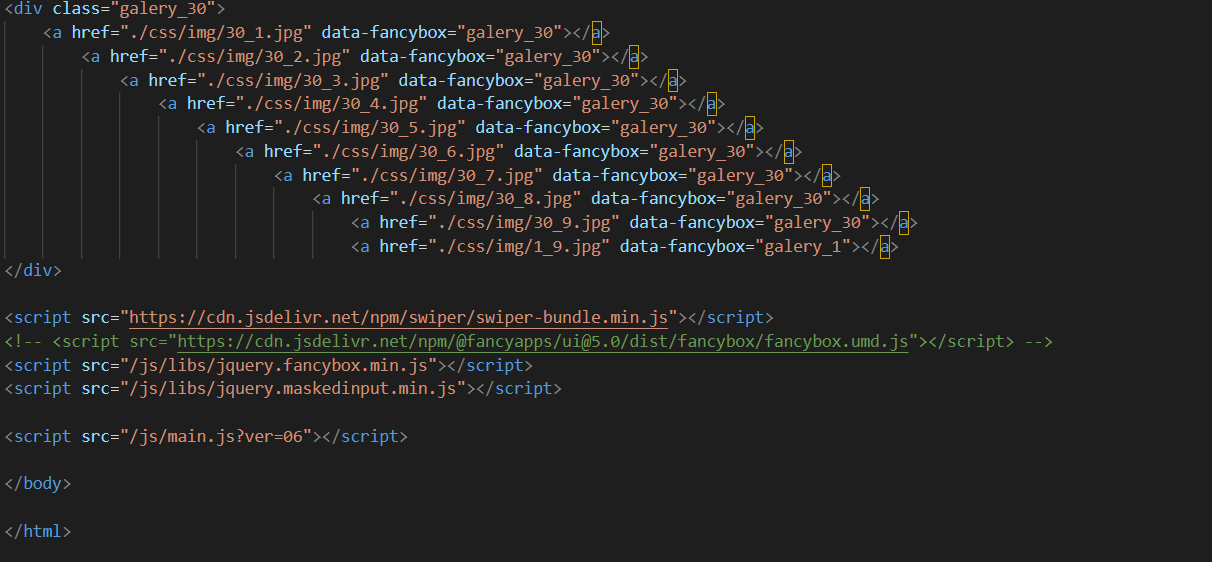
Приложу изображение кода что библиотеки вынесены отдельно. Насчет data-fancybox="galery_1" вот она как раз таки и решает проблему но я четко уверен что по хорошему нужно сделать все по уму а не вот этот костыль , который я придумал в попытке хоть как то это починить.
Опишите проблему, и специалист поможет с настройкой, исправлением ошибки или доработкой сайта. Подберём понятный план работ без лишней переписки.

Пока нет других ответов. Будьте первым, кто поможет автору.
Ответить на вопрос
Fancybox is a popular JavaScript library used for displaying images, videos, and other multimedia content in a stylish and interactive way. If you are facing issues with Fancybox on your website, there could be several reasons behind it. Here are some common problems and their solutions:
1. Fancybox not opening or displaying content:
- Make sure you have included the necessary CSS and JavaScript files for Fancybox in your HTML document.
- Check that you have initialized Fancybox correctly with the appropriate selector for the elements you want to display in the lightbox.
- Verify that the content you are trying to display is accessible and properly formatted.
2. Fancybox not working on mobile devices:
- Ensure that your website is responsive and mobile-friendly, as Fancybox may not work correctly on devices with small screens if the layout is not optimized.
- Check for any conflicts with other JavaScript libraries or plugins that may be affecting Fancybox's functionality on mobile devices.
3. Fancybox not closing or navigating between items:
- Make sure you have set up the navigation controls (such as arrows or thumbnails) correctly to allow users to move between different items displayed in the Fancybox gallery.
- Check for any JavaScript errors in the console that may be preventing Fancybox from functioning as expected.
4. Fancybox styling or appearance issues:
- Customize the Fancybox styles using CSS to match the design of your website and make it visually appealing.
- Adjust the Fancybox settings, such as animation speed, transition effects, and overlay color, to achieve the desired look and feel.
If you have tried the above solutions and are still experiencing problems with Fancybox, consider seeking help from the Fancybox community forums or documentation for more specific guidance. Remember to always test your website on different browsers and devices to ensure a seamless user experience with Fancybox.
// Sample PHP code can be included here if relevant to the issue// Sample PHP code can be included here if relevant to the issue