
Настройка шрифта HTML + CSS?
Всем доброго времени суток. Вопрос собственно таков, не понимаю как это работает и как это убрать.
Есть форма. в ней есть div, в этом div, есть input, label (вообще может быть что-то другое, например span)
При нажатии на input, шрифт текста в label, становится как будто тоньше, как это исправить, а так же, в самих ссылках может быть такое дело.
Примечание: Знакомый заходил, у него было все нормально, я так понимаю это от разрешение экрана зависит.
codepen
Скрины:
Скрин формы:
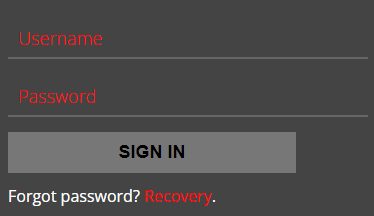
Скрин формы при клике на input:

HTML:
<!DOCTYPE html> <html lang="en"> <head> <meta charset="utf-8"> <meta http-equiv="X-UA-Compatible" content="IE=edge"> <meta name="viewport" content="width=device-width, initial-scale=1.0, user-scalable=0, shrink-to-fit=no"> <link rel="stylesheet" type="text/css" href="style/css/style.min.css"> </head> <body class="page"> <div class="page__wrapper"> <form class="form"> <div class="form__field"> <input type="text" class="form__input" required> <label class="form__label">Username</label> </div> <div class="form__field"> <input type="password" class="form__input" required> <label class="form__label">Password</label> </div> <div class="form__field"> <button class="form__button">Sign In</button> </div> <div class="form__field"> <p class="form__desc">Forgot password? <a href="#" class="form__link">Recovery</a>.</p> </div> </form> </div> </body> </html> |
<!DOCTYPE html> <html lang="en"> <head> <meta charset="utf-8"> <meta http-equiv="X-UA-Compatible" content="IE=edge"> <meta name="viewport" content="width=device-width, initial-scale=1.0, user-scalable=0, shrink-to-fit=no"> <link rel="stylesheet" type="text/css" href="style/css/style.min.css"> </head> <body class="page"> <div class="page__wrapper"> <form class="form"> <div class="form__field"> <input type="text" class="form__input" required> <label class="form__label">Username</label> </div> <div class="form__field"> <input type="password" class="form__input" required> <label class="form__label">Password</label> </div> <div class="form__field"> <button class="form__button">Sign In</button> </div> <div class="form__field"> <p class="form__desc">Forgot password? <a href="#" class="form__link">Recovery</a>.</p> </div> </form> </div> </body> </html>
SCSS null:
*, *:before, *:after { margin: 0; padding: 0; border: none; box-sizing: border-box; } a { text-decoration: none; &:hover, &:visited { text-decoration: none; } &:focus, &:active { outline: none; } } :focus, :active { outline: none; } ul li, ol li { list-style: none; } h1, h2, h3, h4, h5, h6 { font-size: inherit; font-weight: 400; } nav, header, main, aside, footer { display: block; } img { vertical-align: top; } html, body { width: 100%; height: 100%; font-size: 62.5%; font-style: normal; font-weight: normal; font-stretch: normal; line-height: 1; text-size-adjust: 100%; } input { border-radius: 0; } input, textarea, button { font-size: inherit; font-style: inherit; line-height: normal; font-weight: 400; } input::-ms-clear { display: none; } input:focus-visible { outline: none; } button { cursor: pointer; } button::-moz-focus-inner { padding: 0; border: none; } |
*, *:before, *:after { margin: 0; padding: 0; border: none; box-sizing: border-box; } a { text-decoration: none; &:hover, &:visited { text-decoration: none; } &:focus, &:active { outline: none; } } :focus, :active { outline: none; } ul li, ol li { list-style: none; } h1, h2, h3, h4, h5, h6 { font-size: inherit; font-weight: 400; } nav, header, main, aside, footer { display: block; } img { vertical-align: top; } html, body { width: 100%; height: 100%; font-size: 62.5%; font-style: normal; font-weight: normal; font-stretch: normal; line-height: 1; text-size-adjust: 100%; } input { border-radius: 0; } input, textarea, button { font-size: inherit; font-style: inherit; line-height: normal; font-weight: 400; } input::-ms-clear { display: none; } input:focus-visible { outline: none; } button { cursor: pointer; } button::-moz-focus-inner { padding: 0; border: none; }
SCSS style:
@import url('https://fonts.googleapis.com/css2?family=Open+Sans:ital,wght@0,300;0,400;0,700;1,300;1,400;1,700&display=swap'); @import '_null.scss'; $margin: 1rem; $padding: 1rem; .page { color: #FFF; font-family: 'Open Sans', sans-serif; background-color: #333; &__wrapper { width: 100%; min-height: 100vh; display: flex; align-items: center; justify-content: center; .form { padding: calc(#{$padding} * 2) $padding; width: 380px; background-color: #444; &__field { margin: calc(#{$margin} * 1.5) auto 0; position: relative; &:first-child { margin-top: 0; } } &__input, &__label { padding: $padding; color: #F00; font-size: 1.8rem; font-weight: 300; line-height: normal; border-bottom: 0.2rem solid transparent; } &__input { width: 100%; border-bottom-color: #666; background-color: transparent; } &__label { top: 0; left: 0; position: absolute; pointer-events: none; } &__button { padding: $padding; width: 80%; display: block; font-size: 1.8rem; font-weight: 700; text-transform: uppercase; background-color: #777; } &__desc { color: #FFF; font-size: 1.6rem; } &__link { color: #F00; } } } } |
@import url('https://fonts.googleapis.com/css2?family=Open+Sans:ital,wght@0,300;0,400;0,700;1,300;1,400;1,700&display=swap'); @import '_null.scss'; $margin: 1rem; $padding: 1rem; .page { color: #FFF; font-family: 'Open Sans', sans-serif; background-color: #333; &__wrapper { width: 100%; min-height: 100vh; display: flex; align-items: center; justify-content: center; .form { padding: calc(#{$padding} * 2) $padding; width: 380px; background-color: #444; &__field { margin: calc(#{$margin} * 1.5) auto 0; position: relative; &:first-child { margin-top: 0; } } &__input, &__label { padding: $padding; color: #F00; font-size: 1.8rem; font-weight: 300; line-height: normal; border-bottom: 0.2rem solid transparent; } &__input { width: 100%; border-bottom-color: #666; background-color: transparent; } &__label { top: 0; left: 0; position: absolute; pointer-events: none; } &__button { padding: $padding; width: 80%; display: block; font-size: 1.8rem; font-weight: 700; text-transform: uppercase; background-color: #777; } &__desc { color: #FFF; font-size: 1.6rem; } &__link { color: #F00; } } } }
Дополнительно:
все ваши выкладки кода не воспроизвести вот так сразу. Ссылка на сайт или на codepen, возможно, поможет в решении.
Знакомый заходил - норм. Вы сбросьте кэш и тоже зайдите, либо зайдите в режиме инкогнито.
я думаю это возможно.
Искал достаточно долго, ничего не нашел.
P.S благодарю за ответ.
Опишите проблему, и специалист поможет с настройкой, исправлением ошибки или доработкой сайта. Подберём понятный план работ без лишней переписки.

Пока нет других ответов. Будьте первым, кто поможет автору.
Ответить на вопрос
Для настройки шрифта с помощью HTML и CSS, вам потребуется использовать стили CSS. В HTML вы можете определить элемент, к которому хотите применить стили, с помощью атрибута class или id. Далее в CSS файле или внутри тега вы можете задать нужные параметры для шрифта.
Пример использования CSS для настройки шрифта:
        .custom-font {
            font-family: Arial, sans-serif;
            font-size: 16px;
            font-weight: bold;
            color: #333;
        }


    <p class="custom-font">Этот текст будет отображаться шрифтом Arial, размером 16px, жирным и цветом #333.</p>
.custom-font { font-family: Arial, sans-serif; font-size: 16px; font-weight: bold; color: #333; } <p class="custom-font">Этот текст будет отображаться шрифтом Arial, размером 16px, жирным и цветом #333.</p>
В данном примере мы создали класс .custom-font, в котором указали параметры шрифта: Arial в качестве основного шрифта, размер 16px, жирный текст и цвет #333. Затем мы применили этот класс к элементу
, чтобы текст внутри этого элемента отображался с заданными стилями.
Таким образом, вы можете настраивать шрифт с помощью CSS, указывая нужные параметры для шрифта, такие как семейство шрифтов, размер, начертание и цвет. Помните, что для использования CSS стилей необходимо подключить CSS файл или встроить стили непосредственно в HTML документ.